Turn a Photo Into a Glowing Lithophane Lamp
A plain white print that turns into a family photo, a pet or a wedding day when the light comes on — a handmade gift in five steps, with the tools for each.
Published October 4, 2026 · 6 picks
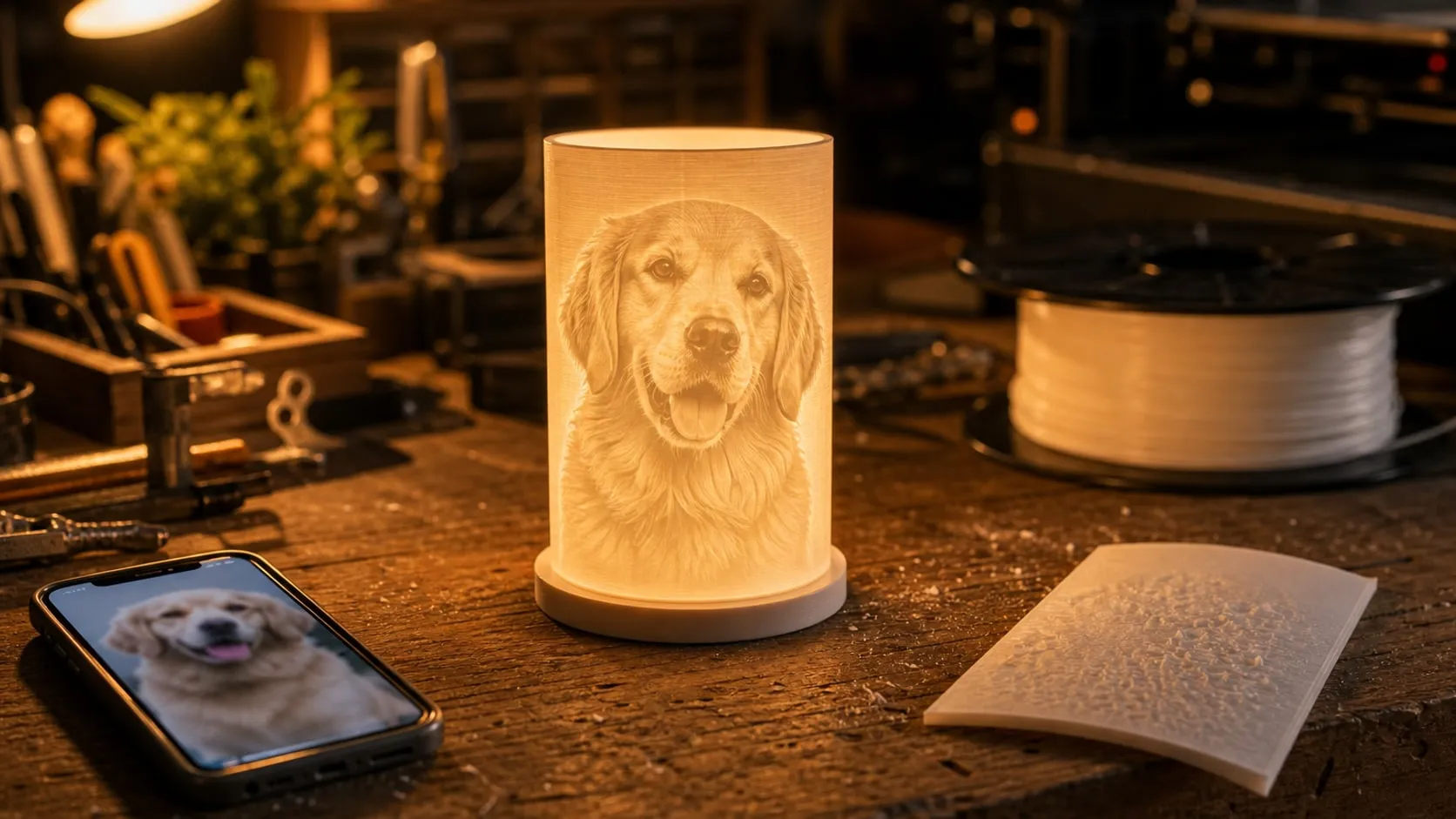
A lithophane looks like a blank, bumpy white panel until you switch the light on. Then the photo appears: your dog asleep on the couch, the grandkids on the beach, a wedding portrait, in soft shades like an old print. That moment is what makes it such a good gift. It’s personal, it’s handmade, and it works for almost anyone: grandparents, new parents, a friend who lost a pet, a couple on their anniversary. Here’s the whole process, with the tools for each step below.
Step 1: Pick the right photo
A lithophane shows a photo in shades of one color, so contrast decides the result more than resolution does.
- Close and simple. Faces that fill the frame beat a group of tiny people on a big landscape.
- Good light and clear contrast. A face lit from the side keeps its shape; a dark photo turns into a dark panel.
- A plain background. Busy patterns behind the subject compete with it once everything is gray.
- Crop and brighten before you start. A slight boost in brightness and contrast in any photo app helps more than any setting later.
Step 2: Turn the photo into a lithophane model
Free web tools such as ItsLitho, 3dp.rocks and the lithophane makers on MakerWorld turn a photo into a 3D file in a minute. Light areas become thin plastic, dark areas thick. Choose the shape first:
- A curved panel or a cylinder shade for a lamp. Many lamp models on MakerWorld are designed around a round LED base (search “MH001” for the kit below) and generate a matching shade from your photo.
- A flat panel for a light box or a frame lit from behind.
Typical settings to start with: 0.8 mm minimum thickness, 3 mm maximum, and a panel or shade about 4–6 in (100–150 mm) tall. Most tools set these by default; leave them until you’ve seen a first print.
Step 3: Print it in white PLA
Lithophanes look simple but need a few settings most prints don’t:
- 100% infill. Any infill pattern shows up as a grid across the photo when it’s lit.
- Stand it upright with a brim, so the fine detail is drawn by the printer’s horizontal movement.
- Fine layers, slow outer walls. 0.12 mm layers and a slower outer wall speed keep the stripes out of faces.
- Plain white PLA. Colored, silk or translucent filament tints the image or washes it out.
A palm-sized panel takes a few hours. Hold it up to a window when it’s done; the photo should already be clearly visible.
Step 4: Choose the light
The light matters almost as much as the print. Three ways to do it:
- A lamp base kit for round shades: a small dimmable LED module pressed into a printed base. The tidiest result.
- A COB LED strip around the inside of a box or frame for flat panels. Keep at least an inch between the strip and the lithophane, and the light spreads evenly.
- A battery puck light in the base for a cordless lamp that works on any shelf or nightstand.
Use warm white (around 3000K) for photos of people and pets: skin and fur look natural, while cool white makes them look gray. LEDs run cool, but don’t put PLA lithophanes over incandescent or halogen bulbs; PLA softens at around 140 °F (60 °C).
Step 5: Power it, test it, wrap it
Plug the lamp into the USB charger you’ll give with it and let it run for an hour. Check for flicker, loose cables and any bright spots showing through. If one area looks too bright, the light is too close or that part of the panel is too thin; move the light back or reprint with a thicker minimum.
Then wrap it with the light switched off. The best part of the gift is the moment someone turns it on and sees the photo appear.
What it costs in time: a few minutes for the photo and the model, three to six hours of unattended printing, and half an hour to fit the light and test it. The tools for steps 3 to 5 are below.
At a glance
6 picksAs an Amazon Associate I earn from qualifying purchases. If you buy through a link on this page we may earn a small commission, at no extra cost to you. How this works.
ELEGOO Centauri Carbon 3D Printer (CoreXY, Enclosed)
An enclosed printer that arrives calibrated, with room for a tall lamp shade.
A lithophane is one of the most forgiving things to print well and one of the easiest to print badly: it’s a thin, tall wall where every wobble and layer shift shows up as a stripe in someone’s face. A stiff, enclosed printer that comes calibrated removes most of those variables before the first print.
The Centauri Carbon arrives assembled, levels its own bed and has a build volume big enough for a 6-inch panel or a lamp shade in one piece. The camera is handy for lithophanes in particular: they print for hours, and you can check the first layers from another room.
Pro tip Print lithophanes standing upright with a brim, not lying flat. The printer’s fine horizontal movement then draws the detail, and the brim keeps the tall, thin panel from rocking loose halfway through.
Why we like it
- ✓Arrives fully assembled and pre-calibrated, with auto bed leveling
- ✓256 × 256 × 256 mm (10 × 10 × 10 in) build volume — room for a large panel or a tall lamp shade
- ✓Enclosed CoreXY frame on a die-cast aluminum chassis
- ✓Built-in chamber camera for checking long prints and recording time-lapses
- ✓Dual-sided plate with a PLA-specific surface, ELEGOO says
Keep in mind
- !About 16 × 16 × 19 in — it needs its own table, not a corner of a desk
- !Prints one material at a time; multicolor needs the separate Combo version
- Build volume
- 256 × 256 × 256 mm
- Motion
- CoreXY, up to 500 mm/s
- Nozzle
- Hardened steel, up to 320 °C
- Leveling
- Automatic
- Camera
- Built-in, chamber
- Size
- 15.67 × 15.9 × 19.29 in
- Model
- Centauri Carbon
ELEGOO PLA Filament, 1.75 mm, 1 kg, White
Plain white PLA, the standard for lithophanes, in neutral tones.
A lithophane is a photo stored as thickness: thin plastic glows bright, thick plastic stays dark. That only works if the plastic itself is neutral, which is why almost every lithophane is printed in plain white PLA. Colored filament tints the whole picture, and silk or translucent filaments wash the detail out.
A full 1 kg spool is enough for many panels and shades, plus a few test prints. Buy one spool and stick with it: once a calibration print looks right with this white, every lithophane after it will too.
Pro tip Before printing the photo, print a small thickness test strip (most lithophane tools offer one) and hold it in front of the light you’ll actually use. It shows how dark your thickest setting really gets.
Why we like it
- ✓White is the standard color for lithophanes — it shows the photo in neutral tones
- ✓±0.02 mm diameter tolerance
- ✓Dried and vacuum sealed before packing, ELEGOO says
- ✓Many colors on the same listing for the lamp base and frame
Keep in mind
- !Each brand's white lets through a different amount of light — switching brands means test-printing again
- !Glossy finish; a matte white hides layer lines on the lit side a little better
- Material
- PLA
- Color
- White
- Diameter
- 1.75 mm ± 0.02 mm
- Weight
- 1 kg
- Part number
- CA-EL-3D-PB02
3DZWMAN LED Lamp Kit 001, 3 Pack (3 Colors, Dimmable, USB)
Round dimmable USB lights made to sit inside printed lamp models.
A lithophane needs light from behind, and the cleaner that light is, the better the photo looks. This kit is a flat, round LED module meant to be pressed into the base of a printed lamp. Many lamp and lithophane-shade models on MakerWorld are designed around it, so the base prints with a matching recess and a slot for the cable.
The three-pack makes sense for a gift project: one lamp for you, two to give, or three versions of the same photo for different people. The inline controller switches color and brightness without opening the lamp.
Pro tip Use the warm white or yellow setting for photos of people. Cool white light makes skin tones on a lithophane look gray and flat; a warmer light makes the same print look like an old photograph.
Why we like it
- ✓Three switchable colors (yellow, warm white, white) and 10 brightness levels
- ✓Made for the "LED Lamp Kit 001" models on MakerWorld (search "MH001")
- ✓Aluminum housing, 5 V / 4 W
- ✓1.5 m USB-A cable with an inline button controller
- ✓Remembers the last color after a power cut
Keep in mind
- !Fits printed bases designed for it; for other lamps you'll need to model a recess about 2.3 in (60 mm) wide
- !USB-A plug only, no power adapter in the box
- !A smaller brand than the printer and filament makers on this page
- Pieces
- 3
- Size
- 2.34 × 2.34 × 0.33 in
- Power
- 5 V USB-A, 4 W
- Colors
- Yellow, warm white, white
- Brightness
- 10 levels
- Cable
- 1.5 m
- Model
- LED Lamp Kit 001
PAUTIX USB COB LED Strip, 3000K Warm White, 6.56 ft
A dotless warm-white strip for lighting flat panels and frames evenly.
Not every lithophane fits a round lamp base. A flat panel in a frame, a box-shaped night light or a wide landscape photo needs light spread along the edges instead. A COB strip is a good fit: the LEDs are packed so tightly that it glows as one line, so you don’t get bright dots showing through the thin parts of the photo.
Stick the strip around the inside of a printed light box, leave a gap of an inch or more to the lithophane, and the light evens out before it reaches the print.
Pro tip Line the inside of the box with white (print it in the same white PLA or tape in white paper). The light bounces around before it hits the lithophane, and the photo glows evenly from corner to corner.
Why we like it
- ✓COB strip — a continuous line of light instead of separate dots
- ✓3000K warm white with CRI above 90
- ✓10-level dimmer that remembers the last setting
- ✓5 V USB, with 3M adhesive backing
Keep in mind
- !Needs a USB port that gives at least 2 A, or it flickers or switches off, PAUTIX says
- !6.56 ft is far more than one small box needs
- Length
- 6.56 ft (2 m)
- LEDs
- 640 (320 per m)
- Color temperature
- 3000K
- CRI
- >90
- Power
- 5 V USB, 8 W
- Dimmer
- 10 levels, with memory
- USB cable
- 2.6 ft
STAR-SPANGLED 2.8 in LED Puck Lights, Warm White, 5 Pack
Battery push lights for a lamp with no cable at all.
A USB lamp is great on a desk next to a charger. On a nightstand, a mantel or a grandparent’s bookshelf, a cable can be the reason a gift ends up in a drawer. A battery puck light solves that: hide it inside the base of the lamp, and the lithophane switches on with a press.
These are the round, push-to-light kind sold for closets and cabinets, about 2.8 in across. Model the lamp base with a matching round pocket and an opening in the bottom, so the light can be pressed or twisted out to change batteries.
Pro tip Use rechargeable NiMH AAA cells and give a spare set with the gift. The lamp is far more likely to stay lit if nobody has to go shopping for batteries.
Why we like it
- ✓Battery powered — no cable running out of the lamp
- ✓Press the lens to switch on and off
- ✓Warm white, 50 lumens, CRI 90
- ✓Twists off its base to change batteries
- ✓Five lights for five lamps
Keep in mind
- !50 lumens is soft — fine for a night-light glow, too dim for thick or dark lithophanes in a bright room
- !On/off only, no dimming
- !Three AAA batteries per light, not included
- Pieces
- 5
- Size
- 2.8 in diameter, 1 in tall
- Brightness
- 50 lm
- Color
- Warm white
- CRI
- 90
- Power
- 3 × AAA per light (not included)
Amazon Basics 24W Dual Port USB-A Wall Charger, White
A two-port USB plug with enough current for the lamp or strip.
USB lamp kits and LED strips come with a USB plug and nothing to plug it into. A phone charger from a drawer often works, but older 1 A chargers can make an LED strip flicker or switch off. When the lamp is a gift, include a charger so the person who unwraps it can plug it in and see the photo light up right away.
This one has two full-power USB-A ports, enough for two lamps on the same outlet or a lamp and a phone.
Pro tip Plug the finished lamp into the exact charger you’re giving with it and leave it on for an hour before wrapping. It’s the best way to catch a flicker or a loose cable before the recipient does.
Why we like it
- ✓Two USB-A ports, 2.4 A each (24 W total)
- ✓Covers the 2 A minimum some USB LED strips need
- ✓White housing that disappears next to a white lamp
- ✓Automatic shutoff and internal safety switch, Amazon says
Keep in mind
- !USB-A only, no USB-C port
- !Not a fast charger for newer phones (non-PPS)
- Ports
- 2 × USB-A
- Output
- 5 V, 2.4 A per port
- Total
- 24 W
- Plug
- US 2-pin
- Model
- LACA272