Portable Green-Screen Creator Kit for TikTok & Shorts
A pop-up green screen, two lights, a ring light, a phone tripod and a clip-on mic — the step-by-step setup for clean green-screen videos on a phone.
Published October 31, 2026 · 5 picks
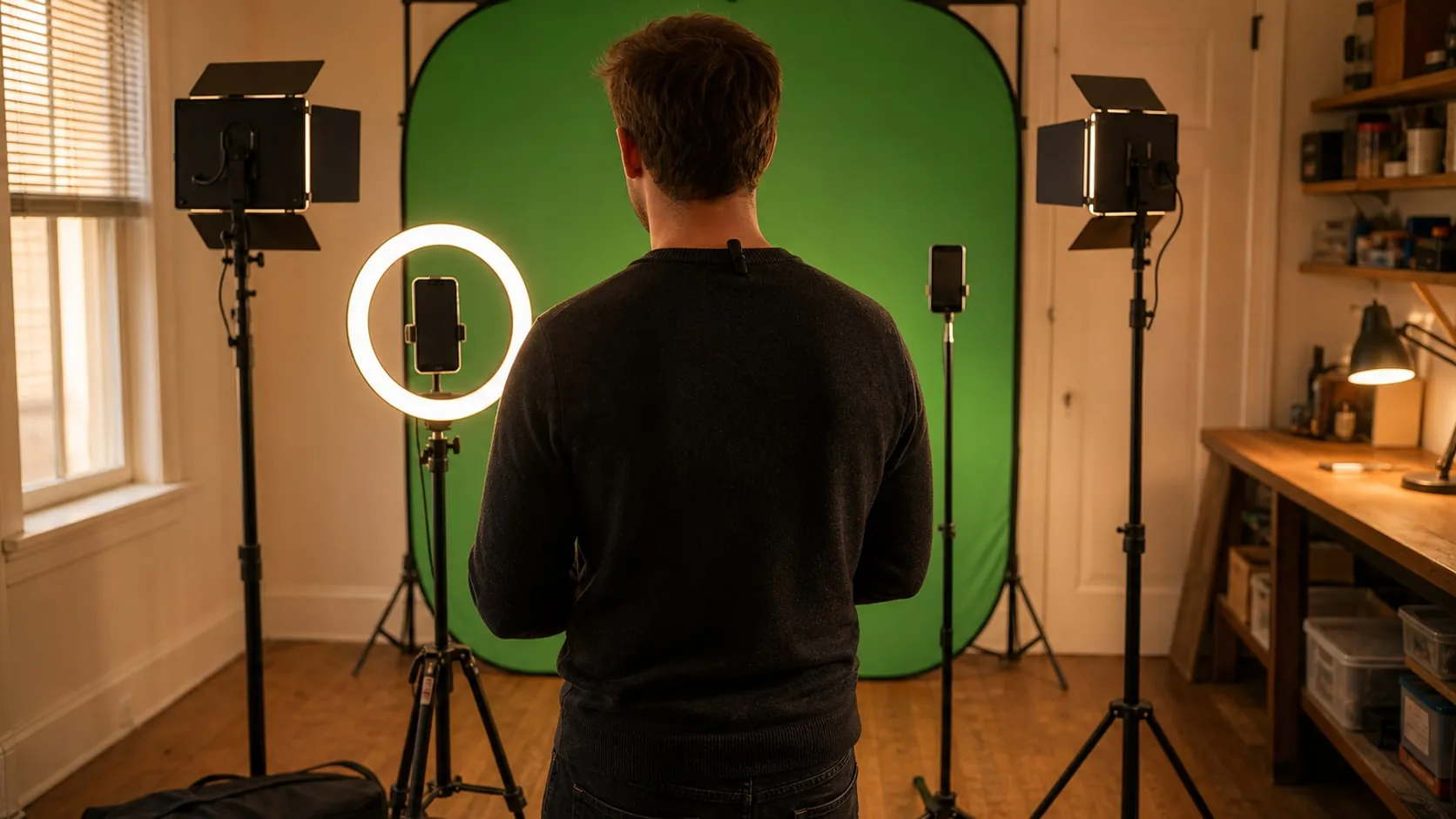
TikTok’s Green Screen effect can drop you in front of any picture without a backdrop at all: the app cuts you out of the scene on its own. It works, but the edges are guesswork. Hair flickers, hands vanish when they move fast, and the background shimmers around your shoulders. A real green screen gives the app (or any editor) a clean color to remove, and the result looks like you’re actually standing in the scene. Here’s how to set one up in a spare corner and pack it away afterwards, step by step, with the gear for each step below.
Step 1: Set up the backdrop
A green screen only works if it’s one even shade of green, so the fabric has to be flat. A pop-up backdrop with a spring frame handles that for you: it opens tight, with no creases to iron out.
- Put it 3–6 ft (1–2 m) behind where you’ll stand. Closer than that and your shadow lands on the green, and green light bounces back onto your hair and shoulders.
- Raise it so it fills the frame behind you. For vertical video, a 5 × 6.5 ft screen covers a person from about the knees up. Head-to-toe shots need a bigger backdrop or a wider room.
- Keep it clean and dry. Smudges and dust show up as darker patches once you key.
Step 2: Light the screen, evenly
The screen needs its own light, separate from the light on you. The goal isn’t bright, it’s even: no hot spot in the middle, no dark corners.
- Put one panel on each side, a few feet in front of the screen, angled at about 45°.
- Aim each light at the far half of the screen, so the two pools of light overlap in the middle.
- Set both to the same brightness and color temperature.
- Fold the barn doors in so the light hits the green, not you.
Check it on the phone: if one side looks darker, move that light, not the camera. Daylight from a window changes as you film, so close the curtains if you can.
Step 3: Light your face
Now light yourself. A ring light in front of you, just above eye level, gives soft, even light with few shadows. Match its color to the panels (if the panels are set to cool white, use a cool setting on the ring too), so you and the background look like they belong in the same shot.
Keep your own light a little brighter than the screen. A brighter subject separates more cleanly from the background, and the keyer has an easier job at the edges.
Step 4: Frame the shot and lock the camera
Mount the phone vertically at roughly chest-to-eye height. The ring light has a phone holder in the middle, which is fine for close talking shots. For wider framing, put the phone on its own tripod a few steps back, so the whole backdrop sits behind you.
- Use the rear camera if you can. It is usually sharper than the front camera, which gives cleaner edges.
- Lock focus and exposure (on most phones, press and hold on your face in the camera app). Otherwise the phone re-adjusts every time you move, and the green changes shade from second to second.
- Start and stop with the remote, so you don’t have to walk to the phone and back between takes.
Step 5: Record clean audio
With the phone across the room, its built-in mic hears the room more than you. A clip-on wireless mic fixes that: clip it on your chest about a hand’s width below your chin, plug the receiver into the phone, and record.
What not to wear: anything green, including a green mic windshield, logo or necklace. Shiny fabrics and very fine stripes also cause trouble. Plain, solid colors that contrast with green are the safest.
Step 6: Key it out
There are two ways to replace the green:
- In the app. TikTok’s Green Screen effect works with or without a backdrop, but a lit green screen behind you gives it far less to guess about.
- In an editor. Most mobile and desktop editors (CapCut, Descript, Premiere and others) have a chroma key tool: pick the green with the color picker, raise the strength until the screen disappears, then lower it until your edges stop flickering. If your hair or shoulders look green, many editors have a “spill” or “shadow” setting that removes the green tint.
Record the background clip or pick the image before you film, so you know where to look and point when you’re in front of the screen.
Safety basics: tape or route cables along the wall, since you’ll be stepping back and forth in front of the lights. Spread tripod and stand legs fully, keep them out of walkways and away from kids and pets, and let the LED panels cool before packing them into their bags.
What it costs in time: about ten minutes to unfold the screen and set the lights the first time, less once you mark the light positions on the floor with a bit of tape. Packing up takes about five. The gear for each step is below.
At a glance
5 picksAs an Amazon Associate I earn from qualifying purchases. If you buy through a link on this page we may earn a small commission, at no extra cost to you. How this works.
NEEWER 5x7 ft Chromakey Pop-Up Backdrop with Stand (Green/Blue)
A pop-up green screen that opens flat in seconds and folds into a disc.
Most green-screen trouble starts with the fabric itself: folds, creases and sagging cast small shadows, and every shadow is a slightly different green that the keyer has to guess about. A pop-up panel avoids most of that. The fabric is stretched over a spring frame, so it is flat the moment it opens.
That also makes it the portable choice. It folds into a flat disc, goes behind a door or under a bed, and comes back out in under a minute. The stand clips it at the right height behind you; without the stand, it leans against a wall just as well.
Pro tip Stand at least 3–6 ft (1–2 m) in front of the screen, not right against it. The extra distance keeps your shadow off the green and stops green light from bouncing onto your hair and shoulders.
Why we like it
- ✓Steel spring frame keeps the fabric tight, which means fewer wrinkles and shadows to key out
- ✓Reversible — green on one side, blue on the other
- ✓Folds to about 65 × 65 × 3 cm (26 × 26 × 1.2 in) with its own carry bag
- ✓Includes a stand and a clip, or lean it against a wall or door
Keep in mind
- !5 × 6.5 ft covers a person from the waist or knees up, not head-to-toe shots
- !The carry bag fits only the backdrop; the stand travels separately
- !Folding a pop-up panel back into its disc takes a few tries to learn
- Size
- 150 × 200 cm (about 5 × 6.5 ft)
- Colors
- Green / blue, reversible
- Frame
- Steel spring, sewn in
- Folded
- About 65 × 65 × 3 cm
- Stand
- Aluminum alloy, up to 201 cm (6.6 ft)
- In the box
- Backdrop, stand, clip, carry bag
NEEWER NL660 Bi-Color LED Video Light and Stand Kit, 2 Pack
Two dimmable panels with barn doors to light the backdrop evenly.
A ring light lights you. The green screen needs its own light, and it needs it evenly: a screen that’s bright in the middle and dark at the edges keys out unevenly, with patches of green left around your head. Two matching panels, one on each side, are the simplest way to get a flat, even wash across the whole backdrop.
These panels dim smoothly and switch between warm and cool white, so you can match them to the ring light on your face. The barn doors are the underrated part: fold them in and the light stays on the green instead of spilling onto your shoulders.
Pro tip Set both panels to the same brightness and color, aim each one at the far half of the screen (left light to the right side, right light to the left side), and check the result on your phone screen. Even beats bright.
Why we like it
- ✓0–100% dimming and 3200–5600K color temperature on each panel
- ✓CRI 96+, according to NEEWER, for natural skin tones
- ✓Metal barn doors aim the light at the screen and keep it off you
- ✓Fanless aluminum body — nothing humming on your audio
- ✓Runs from the AC adapter or an NP-F550/F970 battery
- ✓Two stands (26 to 75 in / 66 to 190 cm) and two bags included
Keep in mind
- !Batteries aren't included; without them you need two wall outlets
- !The bulkiest part of the kit — stands and bags take up a closet corner
- Panels
- 2 × 660 LEDs (330 warm + 330 cool)
- Power
- 40 W per panel
- Output
- Up to 3300 lux at 1 m (per listing)
- Color temperature
- 3200–5600K
- CRI
- 96+
- Power options
- AC adapter or NP-F550/F970 battery (not included)
- Stands
- 26–75 in (66–190 cm)
- In the box
- 2 lights, 2 diffusers, 2 barn doors, 2 stands, 2 adapters, 2 bags
UBeesize 12" LED Ring Light with 62" Tripod Stand and Phone Holder
Soft front light on your face, with the phone held in the middle of the ring.
In a green-screen video, the backdrop gets the big lights, and your face needs its own. A ring light is the simplest way to do that: it sits right behind the phone and throws soft, even light straight at you, filling in the shadows under the eyes and the chin.
This one holds the phone in the middle of the ring, so light and camera are lined up without extra mounts, and it runs over USB, which means a power bank can run it when you film away from an outlet. Set its color to match the panels on the screen so your skin and the background don’t look like they were shot in two different rooms.
Pro tip Raise the ring slightly above eye level and tilt it down a little. Light from just above looks natural; light from below makes everyone look like they’re telling a ghost story.
Why we like it
- ✓12-inch ring with 240 LEDs for soft, even front light
- ✓5 color modes (3000–6000K) and 10 brightness levels
- ✓Phone holder in the center, plus a Bluetooth remote shutter
- ✓Powered over USB, so it can run from a power bank
- ✓Tripod extends to 62 in and converts to a handheld selfie stick
Keep in mind
- !10 W is a face light, not enough to light a green screen on its own
- !Ring lights can leave a round reflection in glasses and eyes
- !A light tripod; keep it out of walkways and away from pets
- Ring
- 12 in, 240 LEDs
- Power
- 10 W, USB
- Color modes
- 5 (3000–6000K)
- Brightness
- 10 levels (10–100%)
- Tripod
- Up to 62 in, converts to selfie stick
- In the box
- Ring light, tripod, phone holder, Bluetooth remote, USB cable
SENSYNE 62" Phone Tripod and Selfie Stick with Wireless Remote
A separate phone stand with a remote, for framing the shot where the camera works best.
The ring light already holds a phone, so why a second stand? Because the best spot for the camera isn’t always the best spot for the light. Put the phone on its own tripod and you can step it back to fit the whole backdrop in a vertical frame, shoot from a lower or higher angle, or film the same take from the side for a cutaway.
It is also the part of the kit that goes outside. Fold it down, clip the phone on and it’s a selfie stick or a travel tripod; the remote lets you start a take from where you stand.
Pro tip Use the phone’s main rear camera when you can, with the screen facing away. It’s usually sharper than the selfie camera and gives cleaner edges to key. Mount it vertically for TikTok and frame with a little space above your head.
Why we like it
- ✓Extends to 62 in for standing, eye-level shots
- ✓Holder rotates 360° for vertical or horizontal video
- ✓Wireless remote shutter to start and stop recording from in front of the screen
- ✓Universal 1/4 in screw for a small camera or webcam
- ✓Turns into a selfie stick when you leave the backdrop at home
Keep in mind
- !Rated for about 2.2 lb (1 kg) — fine for phones, not for a heavy camera
- !A slim tripod; spread the legs fully and keep it off rugs that wobble
- Max height
- 62 in (157 cm)
- Material
- Aluminum
- Load
- Up to 2.2 lb (per listing)
- Mount
- Rotating phone holder + 1/4 in screw
- Weight
- About 650 g
- In the box
- Tripod/selfie stick, phone holder, adapter, wireless remote
RØDE Wireless Micro (2 Mics + Charging Case), USB-C
Two clip-on mics with a receiver that plugs straight into a USB-C phone.
Viewers will forgive a slightly soft picture, but not echoey, distant audio. In a green-screen setup the phone is usually a few feet away, and its built-in mic picks up the room as much as your voice. A clip-on mic a few inches from your mouth fixes that.
The Wireless Micro is about as simple as wireless mics get: plug the receiver into the phone, take a mic out of the case and it’s connected. With two mics in the box, a second person can join a video without a second setup.
Pro tip Clip the mic on your chest, roughly a hand’s width below the chin, and keep it off green clothing (or anything green), or the keyer may cut a hole where the mic sits.
Why we like it
- ✓Receiver plugs straight into a USB-C phone — no app or pairing, according to RØDE
- ✓Two pre-paired mics for solo or two-person videos
- ✓GainAssist adjusts levels automatically
- ✓Charging case gives up to 21 hours of combined use
- ✓Furry windshields and magnetic attachments included
Keep in mind
- !USB-C phones only (iPhone 15 and later, USB-C Android); Lightning iPhones need the other version
- !The receiver uses the phone's charging port while you record
- Mics
- 2 transmitters, omnidirectional
- Receiver
- USB-C, plugs into the phone
- Frequency range
- 20 Hz – 20 kHz
- Battery
- Up to 21 h combined with the case
- Model
- WIMICROC
- In the box
- 2 mics, receiver, charging case, 2 windshields, 2 magnetic clips, USB-C cable